
Businesses with multiple physical locations face a different SEO challenge from businesses serving only one area. A company may operate several branches in the same city, multiple cities, or even different regions while wanting each location to appear in relevant local searches. This is where local SEO for multiple locations becomes important. Instead of optimizing one website around a single location, businesses need a scalable approach that helps search engines understand where each branch operates and what services it provides.
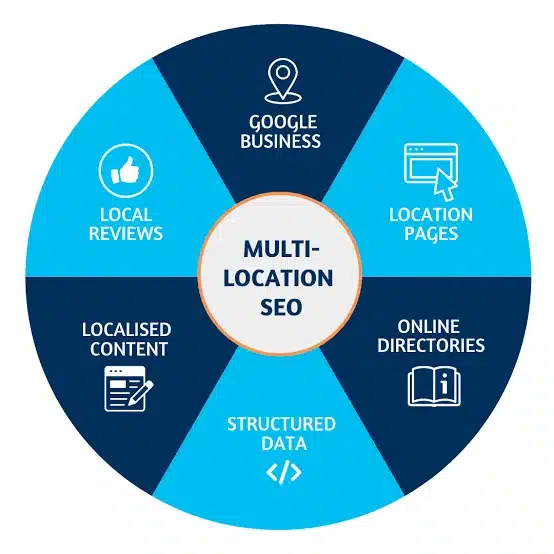
A strong multi-location strategy combines location-specific pages, Google Business Profiles, local content, citations, reviews, internal linking, and technical SEO.
What Is Local SEO for Multiple Locations?
Local SEO for multiple locations is the process of optimizing a business’s online presence so that each physical location can appear in relevant local search results.
For example, a dental company with branches in Texas, Missouri, and Kentucky may want each location to rank for searches such as:
- Dentist in Texas
- Dentist in Missouri
- Dentist in Kentucky
The goal is not to create identical pages with different city names. Each location should provide genuinely useful information about that specific branch.
Related Article: 10 Affordable Local SEO Services For Your Business
Why Multi Location SEO Matters?
Multi location SEO helps businesses compete for searches across different geographic areas. A single website can potentially attract customers from multiple locations, but search engines need clear signals about where the business operates. A well-structured strategy can help:
- Improve local search visibility
- Attract customers near each branch
- Increase location-specific website traffic
- Support Google Business Profile visibility
- Generate more local leads
- Build stronger regional authority
How to Do Local SEO for Multiple Locations?
1. Create a Dedicated Page for Each Location
One of the most important parts of a local SEO strategy for multiple locations is creating useful location pages. For example:
- /locations/Texas/
- /locations/Missouri/
- /locations/Kentucky/
Each page should contain information about that location including details such as:
- Business name
- Address
- Phone number
- Opening hours
- Services
- Directions
- Parking information
- Nearby landmarks
- Location-specific FAQs where useful
- Photos
- Customer reviews or testimonials where appropriate
Create a dedicated, optimized page for each target location to improve local search visibility.
2. Optimize Each Google Business Profile
Each eligible physical location should have its own Google Business Profile. Make sure information such as the following is accurate and consistent:
- Business name
- Address
- Phone number
- Website
- Business category
- Opening hours
- Photos
Keep each profile updated as the business changes. For businesses with many locations, managing profiles consistently is an important part of local search management.
3. Keep NAP Information Consistent
NAP stands for, Name, Address, Phone number. Your location information should be accurate and consistent across your website, Google Business Profiles, directories, and other relevant platforms.
For example, avoid using different versions of a branch address across important business listings unless there is a legitimate reason.
4. Build Location-Based Content
Location based SEO is more effective when your website provides useful information relevant to each area. Instead of repeatedly publishing generic city pages, create content that answers questions local customers actually have. For example, a home renovation company could publish:
- Home renovation trends in Texas
- Average renovation considerations for homes in Missouri
- How to choose a contractor in Kentucky
Create relevant location-based content that addresses the needs and interests of customers in each area.
5. Use Location-Specific Keywords
Keyword research should identify how people search for your services in different locations. For example:
Service + City = Digital marketing agency Texas
Service + Area = Digital marketing agency Houston
Service + Near Me = Digital marketing agency near me
Instead of forcefully adding keywords, it’s important to use them naturally in page titles, headings, URLs, content, and other relevant areas.
6. Optimize Location Page Titles and Headings
Each location page should have a title and heading structure. For example:
Title: Digital Marketing Agency in Texas | Company Name. H1: Digital Marketing Agency in Texas. Also, supporting headings can cover:
- Our Texas Services
- Why Choose Our Texas Team?
- Visit Our Texas Office
- Areas We Serve
Optimize page titles and headings with relevant location keywords to improve local search relevance.
7. Add Internal Links Between Locations
Internal linking can help search engines find and understand your location pages. So, create a central location page such as:
Our locations, then link to individual branches:
- Texas
- Missouri
- Kentucky
- New York
Add relevant internal links between location pages to strengthen site structure and local SEO signals.
8. Build Local Citations
Local citations are online mentions of your business information. They can appear on:
- Business directories
- Industry websites
- Local directories
- Chamber of commerce websites
- Relevant local publications
Build accurate and consistent local citations across relevant directories and business platforms.
9. Earn Local Backlinks
Backlinks from relevant local websites can strengthen a location’s online presence. Some good sources include:
- Local news websites
- Community organizations
- Industry associations
- Local businesses
- Events
- Sponsorships
- Regional publications
Earn relevant backlinks from local websites, businesses, and authoritative sources to strengthen local rankings.
10. Get Genuine Reviews
Reviews can provide valuable local trust signals and help potential customers evaluate a business. Encourage genuine customers to leave honest reviews for the location they visited.
Avoid buying reviews or asking customers to submit misleading feedback. Respond professionally to reviews and address legitimate concerns when needed.
Location-Based SEO for Service Areas
Not every business operates from multiple physical locations. Some businesses serve customers across several areas from one office.
This creates an important distinction. A service-area business should not automatically create fake office locations or Google Business Profiles simply to target more cities.
Instead, create location-based content where it provides genuine value and clearly explain the areas you serve.
Optimize Images for Each Location
Images can make location pages more useful and authentic. Therefore, consider adding:
- Exterior photos
- Interior photos
- Staff photos
- Products or services
- Local surroundings
- Parking areas
Use descriptive file names and appropriate alt text. For example, lahore-office-building.jpg is more descriptive than image123.jpg
Technical SEO for Multiple Locations
Technical SEO becomes increasingly important as the number of location pages grows. Make sure:
- Every important location page is indexable
- URLs are consistent
- Pages are included in the website’s internal linking structure
- XML sitemaps contain relevant URLs
- Canonical tags are correct
- Location pages are not accidentally duplicated
- Mobile pages work properly
- Page speed remains healthy
If a business has hundreds of locations, monitor the website regularly for indexing and crawl issues.
Final Words
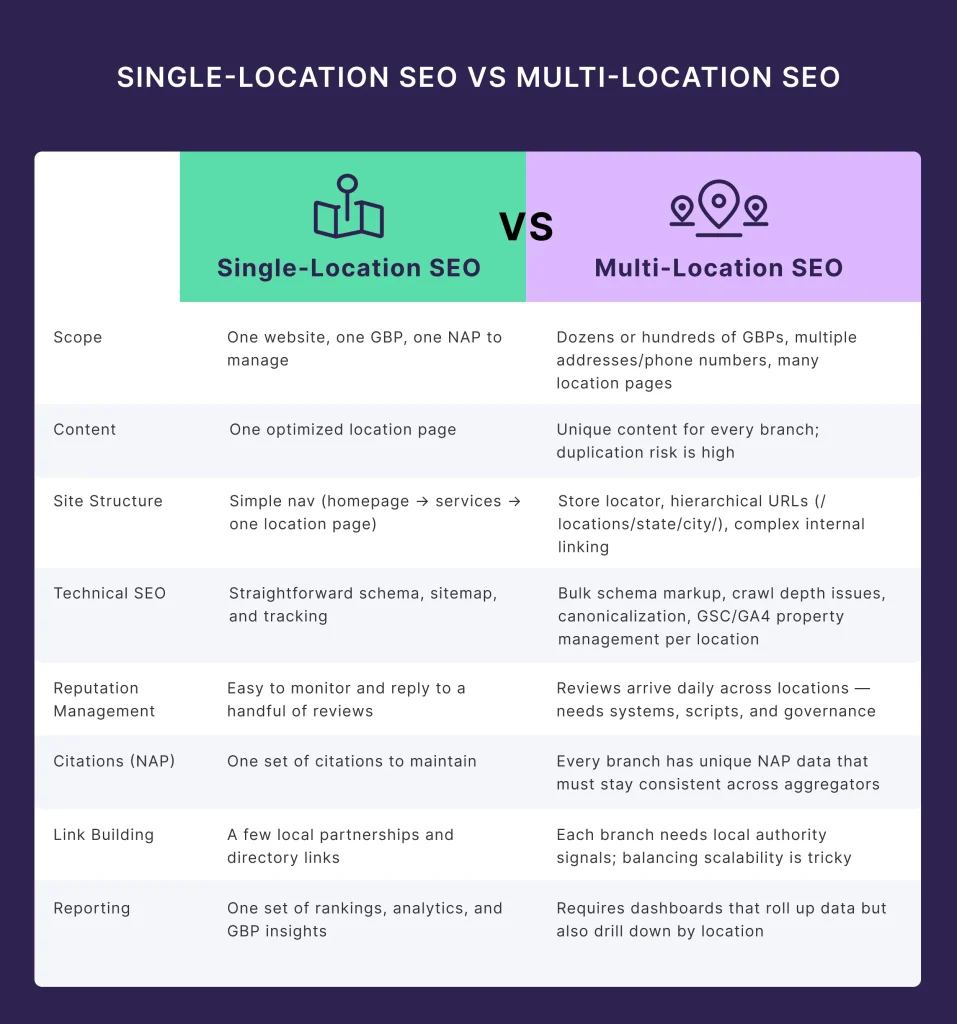
A successful local SEO for multiple locations strategy requires more than adding different city names to the same webpage.
Each location needs a clear online presence supported by accurate business information, useful local pages, optimized Google Business Profiles, relevant content, reviews, citations, internal links, and strong technical SEO.
For businesses operating several branches in the same city, the focus should be on highlighting genuine differences between locations rather than creating duplicate pages.
When managed rightly, multi-location SEO can help businesses increase local visibility, attract customers from different areas, and build an organic search strategy.
Frequently Asked Questions
1. Can a business rank for multiple locations with one website?
Yes. A single website can rank for multiple locations when each location has a legitimate presence and useful, location-specific information.
2. Should every location have a separate URL?
For businesses with multiple genuine branches, separate location URLs usually make it easier to organize and optimize information for each branch.
3. Can multiple locations compete with each other in Google?
Yes, especially when locations target the same searches. Clear geographic targeting and genuinely unique location information can help reduce unnecessary overlap.
4. How long does it take to see results from multi-location SEO?
Results vary based on competition, website authority, location, and SEO efforts. Some improvements may appear within weeks, while stronger local visibility can take several months.